Most digital signage projects fail not because the equipment is bad, but because there was no strategy. Someone bought shiny displays, loaded a few slides, and called it a day. Six months later, the screens are dead weight. A real strategy answers four questions: Why do these screens exist? Who are they for? What will they show? How will we know if they work?

Why Strategy Matters More Than Screens
I have watched this play out hundreds of times. A company gets excited about digital signage, buys hardware, loads some content, and expects magic. There is no content plan, no measurement, no ownership. Six months later, screens show the same loop or get turned off entirely.
Strategy is what separates signage that drives results from signage that becomes furniture. The technology matters, but it is never the reason a deployment succeeds or fails. I have seen cheap screens with great strategy outperform expensive video walls with none.
If you are planning a new network or trying to rescue one that has gone sideways, this is the framework I use with every client. It has not changed much in 17 years because the fundamentals do not change. The screens get thinner, the software gets better, but the reasons projects fail stay exactly the same.
Define Your Objectives
Before you look at a single screen or CMS platform, answer one question: what are these screens supposed to do for the business? If the answer is "improve communication" or "modernize our spaces," you're not ready. Those aren't goals, they're vibes. Vague objectives produce vague results and, eventually, dead screens.
Every successful project I have worked on started with a specific, measurable goal. Here are the most common use cases I see:
Increase Retail Sales or Upsells
Screens positioned to influence purchase decisions at the point of sale, promoting specific products and time-sensitive offers.
Improve Customer Experience
Wayfinding, queue management, and real-time information that reduces friction and makes visits easier for customers.
Streamline Internal Communication
Replace outdated bulletin boards and email overload with corporate digital signage that employees actually see.
Replace Print Materials
Eliminate recurring print costs while gaining the ability to update messaging instantly across all locations.
Launch Retail Media Programs
Turn your screen network into a revenue channel through DOOH advertising and brand-sponsored content.
Build Brand Awareness at Locations
Reinforce brand identity and storytelling at every physical touchpoint where customers interact with your business.
Pick one or two primary objectives. Not six. A screen that tries to do everything does nothing well. Once your objectives are clear, every other decision (hardware, software, content, measurement) becomes much easier.
Pick the Right Tools
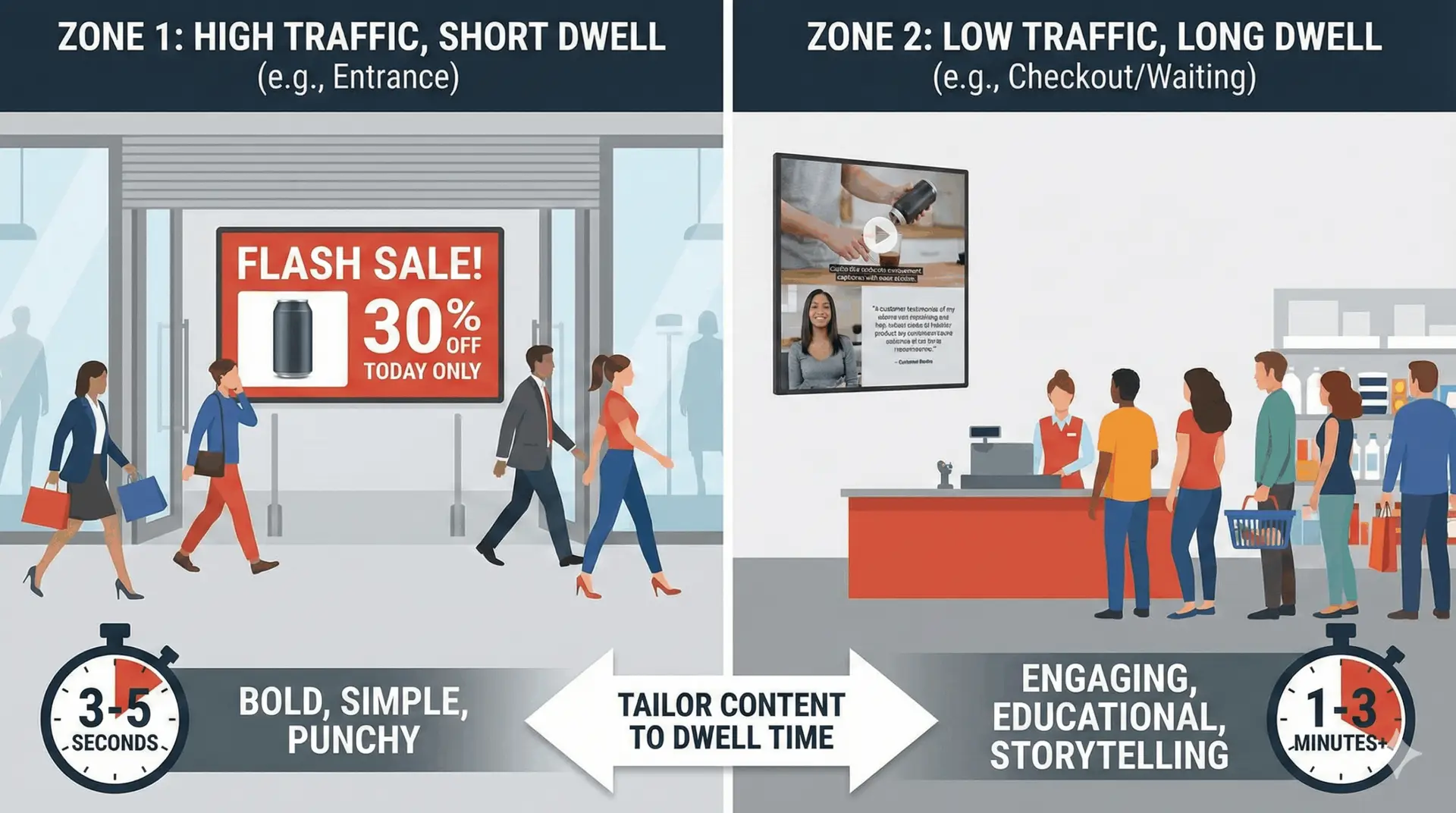
CMS selection is where a lot of projects quietly go sideways. Nobody announces "we picked the wrong platform." What happens instead is that updates get slower, content goes stale, and the screens gradually stop mattering to anyone. The right platform is the one your team will actually log into.
Key Decisions to Make
- Cloud vs on-premise: Cloud is right for most organizations today, but on-premise deployments still make sense for high-security environments or locations with unreliable internet.
- Integrated screens vs separate media players: System-on-chip displays are simpler. External players offer more power and flexibility. The right choice depends on your content complexity.
- Monthly vs one-time costs: SaaS licensing is predictable but adds up. Perpetual licenses cost more upfront but can save money at scale. Do the math for your specific situation.
- Integration capabilities: If your signage needs to pull data from POS systems, calendars, social feeds, or inventory databases, the CMS must support those connections natively or through APIs.
Platforms like Navori, Spectrio, and BrightSign each serve different needs. I have worked with dozens of digital signage vendors over the years, and the honest truth is that no single platform is best for everyone.
The best CMS is the one your team will actually use every day. If it takes 45 minutes to update a single screen, your content will go stale. If the approval workflow requires three emails and a phone call, updates will not happen. I have watched million-dollar platforms collect dust because nobody on the marketing team could figure out the interface without calling IT.
If you are stuck on a CMS that is not working, a CMS migration does not have to be painful. The key is mapping your content and workflows before you touch the new platform, not after.
Plan Your Content
Content is where most projects die. I say this in every consultation, and I will say it here: if you do not have a plan for who creates content, who approves it, and how often it changes, your screens will go stale. It is not a matter of if. It is a matter of when.

What Your Content Plan Needs
- Creative planning aligned with goals: Every piece of content should trace back to one of your defined objectives. If it does not, it should not be on a screen.
- Scheduling and publishing workflows: Who creates? Who reviews? Who publishes? How far in advance? Build this into a calendar that runs parallel to your marketing calendar.
- Quality assurance procedures: Typos on a screen are visible to thousands of people. Brand inconsistencies erode trust. Build a review step that catches problems before they go live.
- Performance measurement: Track which content performs and which does not. Kill what is not working. Double down on what is.
The organizations that succeed with digital signage treat content as an ongoing discipline, not a one-time project. They assign ownership, set expectations, and hold people accountable. The ones that fail treat content creation as something that will magically happen after the screens are installed.
If you are looking for a starting point, free digital signage options can help you test content strategies before committing to a full platform investment. But free or paid, the content plan matters more than the tool.
Measure and Scale
You cannot improve what you do not measure. Start with basic metrics and add complexity as you prove value. For the full framework on what to baseline before launch and how to turn these metrics into a defensible digital signage ROI number, that's its own guide. Here is what to track at each stage:
- Uptime: Are screens actually on and showing the right content? This is the baseline. Not the goal, the floor.
- Content freshness: How old is the content currently playing? If anything is more than two weeks old without a reason, something is broken in your workflow.
- Playback verification: Is the scheduled content actually playing when and where it should be? Remote monitoring catches issues before they become embarrassments.
- Engagement: Where sensors allow, track dwell time and interaction rates. Not every deployment needs this, but retail and public-facing networks benefit enormously.
- Sales correlation: The ultimate metric for revenue-focused deployments. Track sales of promoted products during and after screen campaigns versus control periods.
The AVIXA industry outlook confirms that organizations scaling with proven metrics consistently outperform those that expand on assumptions. Scaling should only happen after you have proven value at a smaller level. I tell every client the same thing: start with a pilot, measure everything, build a case study from the results, then take that case study to leadership and ask for the budget to expand. This works. Asking for a 500-screen rollout budget based on a vendor's promise does not.

When You Need Expert Help
Not every deployment needs a consultant. If you are putting up a few screens in a single location with straightforward content, you can probably figure it out with the vendor's onboarding support.
But there are situations where expert guidance prevents costly errors and accelerates timelines significantly:
- Large deployments across multiple locations where consistency and scalability are critical
- CMS platform switching when your current software is not meeting your needs and you need to migrate without losing content or momentum
- Content workflow struggles where screens are up but content is stale because nobody owns the process
- Vendor evaluation when you need someone who has actually worked with the platforms you are considering and can give you an honest assessment
- Education environments where campus-wide signage requires coordination across departments with competing priorities
The value of bringing in someone who has done this hundreds of times is not that they know something you could not figure out on your own. It is that they know which mistakes to avoid, and those mistakes cost more than the consulting engagement every time.
Common Mistakes That Kill Digital Signage Projects
The same mistakes show up in nearly every deployment I audit, regardless of industry, company size, or budget. They're not surprising. They're predictable. Which makes them all the more frustrating to watch. Here are the ones that do the most damage:
- No clear goals established initially. If you cannot explain what success looks like in one sentence, you are not ready to buy screens.
- Software selection based solely on price. The cheapest CMS is never the cheapest option when you factor in the time your team wastes fighting it.
- Insufficient content planning time. Teams spend months on hardware selection and days on content strategy. It should be the other way around.
- Team training omission. A platform nobody knows how to use is a platform nobody will use. Budget training time or accept stale screens. The digital signage training guide covers how to structure onboarding for every team role.
- Failure to verify performance metrics. If you are not tracking whether the signage works, you cannot defend the budget when someone questions it.
Every one of these mistakes is preventable. None of them are surprising. And yet I see them in the majority of deployments I audit. The problem is not awareness. It is that people get excited about the tech and rush past the planning. Do not be that team.
Future-Proofing Your Digital Signage Strategy
The platforms you're evaluating today will look different in three years. Some will get acquired. Some will quietly drop features. Some will double their licensing fees without warning. That's the reality of a fragmented, fast-moving industry. Here's how to make decisions now that don't trap you later:
- Choose open platforms with API access. If your CMS cannot connect to other systems through standard APIs, you are building on a dead end. Integration requirements only grow over time.
- Avoid proprietary lock-in. If your content only works on one vendor's hardware, or your playlists cannot be exported, you are trapped. I have helped companies through painful CMS migrations that could have been avoided with better initial choices.
- Plan for DOOH advertising and retail media integration. Even if you are not monetizing screens today, building with that capability in mind means you will not need to rebuild when the opportunity arrives.
- Prepare for AI-driven content. Automated scheduling, audience-responsive content, and dynamic data integration are becoming standard. Your CMS and content workflows should be ready.
- Build workflows that scale. What works for 10 screens must also work for 100. If your current process requires manual intervention at every step, it will break when you grow.
Future-proofing is not about predicting the future. It is about making decisions today that keep your options open tomorrow. If you want a deeper dive into the terminology and technology, the digital signage glossary is a good starting point.
The Bottom Line
Plan first, buy second. The most successful digital signage networks I have worked on all started with a clear strategy document before anyone looked at a spec sheet. The worst ones started with someone ordering screens.
Your strategy does not need to be 50 pages. It needs to answer four questions clearly: Why do these screens exist? Who are they for? What will they show? How will we know if they work? If you can answer those, you are ahead of 70% of the deployments out there.
If you're not sure where to start, or you have a network that's underperforming and want a second opinion, let's talk. The problems are almost always fixable. If you're about to go live, read what actually breaks in the first 90 days before you do.
- Strategy comes before any hardware or software purchase.
- Every screen needs a clear purpose tied to a business objective.
- CMS software should match your team's actual capabilities.
- Content planning must include ownership, schedules, and approval workflows.
- Measure business outcomes, not just uptime.
- Start small, prove value, then scale with confidence.
- Future-proof by choosing open platforms and avoiding vendor lock-in.
Jordan Feil is an independent digital signage consultant with 17 years of industry experience. He has worked as a product manager at Navori Labs, a technical account manager, and a global marketing director before founding JAF Digital Consulting. He works with operators, vendors, and integrators on strategy, software selection, network audits, and go-to-market. No commissions, no vendor relationships that shape what he recommends.