$1,500 to $5,000 per screen for a basic setup. A mid-range system runs $3,000 to $8,000 per screen. High-end or outdoor digital signage can hit $15,000 to $25,000+ per screen. But the screen itself is only 20% to 30% of your total cost. The other 70% to 80% comes from content, software, installation, and ongoing support.
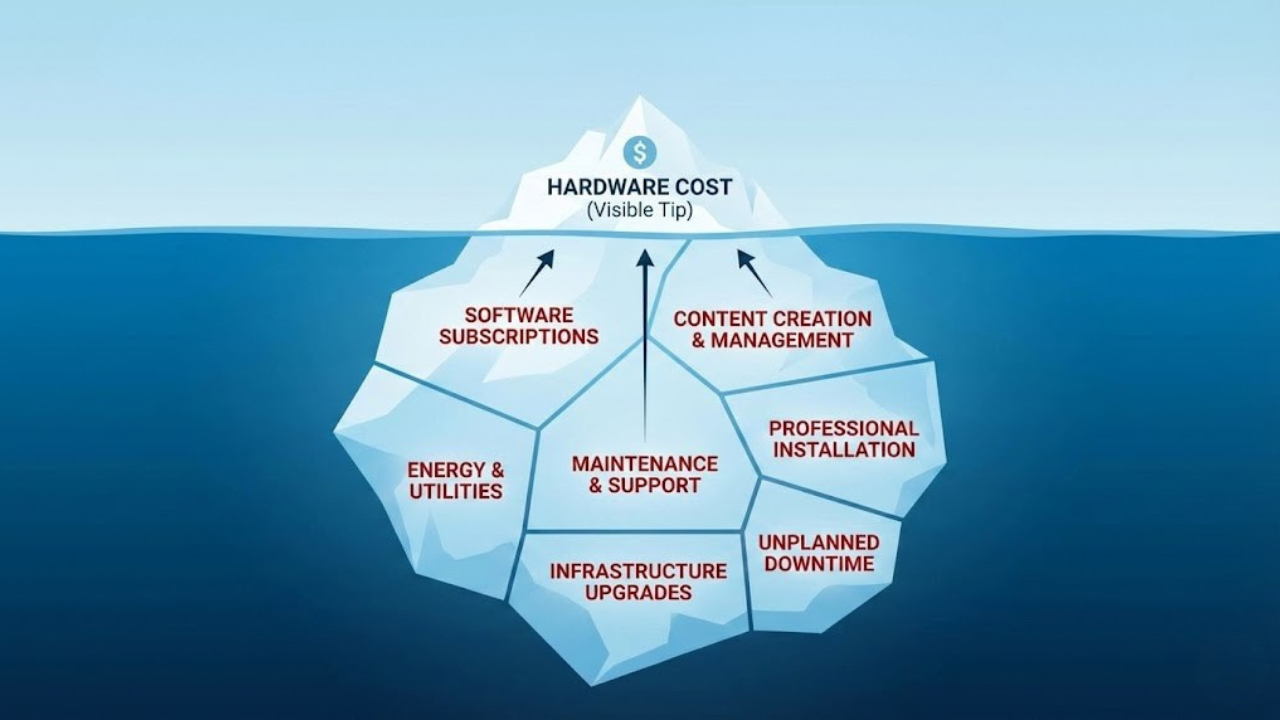
The honest answer is: more than the quote you are looking at.
The problem is simple. Vendors want to sell you hardware. So they lead with screen prices. But screens are just the start. Software, content, installation, training, and support add up fast. Most first-time buyers underestimate their total cost by 40% to 60%.
This guide breaks down every cost category with real price ranges from actual project budgets. No vendor marketing. No affiliate links. Just the numbers you need to plan a realistic budget.
Jordan Feil has spent 17 years in the digital signage industry, working with software vendors like X2O Media and Navori Labs before founding JAF Digital Consulting. This guide is based on real project budgets, not vendor marketing materials.
| Cost Category | Typical Range |
|---|---|
| Commercial display (per screen) | $800 - $3,000 (indoor); $5,000 - $15,000+ (outdoor) |
| Media player (per screen) | $200 - $1,500 depending on type |
| Installation (per screen) | $500 - $5,000+ depending on complexity |
| CMS software (per screen/month) | $10 - $100+ |
| Initial content creation | $1,000 - $50,000+ depending on scope |
| Ongoing content (monthly) | $500 - $3,000 (agency or freelance) |
| Annual maintenance | 5 - 10% of hardware cost |
Digital Signage Hardware Costs
Commercial Displays
Standard indoor commercial displays cost $800 to $3,000. Outdoor screens cost $5,000 to $15,000 or more. High-brightness displays for window-facing spots run $2,000 to $6,000.
| Display Type | Price Range |
|---|---|
| Standard indoor commercial | $800 - $3,000 |
| Large format indoor (55"+) | $1,500 - $5,000 |
| Outdoor digital signage | $5,000 - $15,000+ |
| LED video wall (per panel) | $1,000 - $5,000+ |
| Transparent or specialty | $3,000 - $20,000+ |
You can. Many do. But consumer TVs are not built to run 12 to 16 hours a day. They overheat. They fail faster. Their warranties do not cover commercial use. If you are putting screens in a business, commercial displays pay for themselves in longevity and reliability.

Media Players
You have three options for powering your screens:
| Player Type | Price Range |
|---|---|
| Entry-level external player | $200 - $400 |
| Mid-range external player | $400 - $800 |
| PC-based player | $500 - $1,500 |
| SoC display (built-in) | $0 additional (included in display price) |
System-on-chip displays eliminate the need for a separate media player, but they limit your software choices. External players cost more upfront but give you more flexibility. PC-based players offer the most power for interactive displays and complex content.
Mounts and Enclosures
- Wall mounts: $50 to $300
- Ceiling mounts: $100 to $500
- Floor stands: $200 to $1,000
- Outdoor enclosures: $2,000 to $5,000 per screen
Budget an extra $100 to $300 per screen for cables, adapters, and mounting hardware.
Digital Signage Software Costs
This is where budgets start to go sideways. Digital signage software pricing varies wildly. And the pricing models can be confusing.
Pricing only starts to make sense once you know which platforms you are actually comparing. The platform finder narrows the 20 main options down to a shortlist that fits your deployment, free.
Cloud-Based Software (SaaS)
| Tier | Monthly Cost Per Screen |
|---|---|
| Basic (simple content, small business) | $10 - $30 |
| Mid-range (scheduling, multi-user, analytics) | $20 - $50 |
| Enterprise (API integrations, advanced features) | $40 - $100+ |
Here is the math that catches people off guard: ten screens at $30 per month equals $3,600 per year. Over five years, that is $18,000 in software costs alone. For 50 screens, you are looking at $90,000 over five years.
On-Premise Software
On-premise licenses typically cost $300 to $1,500 per screen as a one-time fee. You will also pay 15% to 20% annually for support and updates. This model works well for organizations that want to control their data and avoid recurring SaaS costs, but it requires internal IT resources to maintain.
Not sure which model fits? See the full comparison of cloud-based digital signage versus on-premise options.
And if "free" is tempting? I've written the full breakdown of why free digital signage software usually backfires - worth reading before you commit.
Digital Signage Installation Costs
Installation is the cost that surprises people most. Professional digital signage installation runs $500 to $2,000 per screen. Complex installs can hit $3,000 to $5,000 per screen or more.
| Scenario | Cost Per Screen |
|---|---|
| Standard indoor installation | $500 - $2,000 |
| Complex indoor (high ceilings, structural) | $2,000 - $5,000+ |
| Outdoor installation | $3,000 - $10,000+ |
| New electrical circuit | $200 - $800 per location |
| Network cabling | $150 - $400 per drop |
The biggest cost drivers: electrical work, structural concerns, height and access requirements, and after-hours labor (night and weekend rates). If you are planning a renovation or new construction, running conduit and network drops during that phase saves thousands later.
Content Creation Costs
This is the hidden budget killer. Your screens are only as good as what is on them. And creating effective digital signage content takes real effort.
Initial Content Development
Expect to spend $1,000 to $10,000 on templates, branded graphics, animations, and initial messaging. Complex projects with custom video production can run $15,000 to $50,000 or more.
Ongoing Content Updates
Two approaches:
- In-house: 5 to 15 hours per month for a small deployment. Lower cost, but requires trained staff and the right tools.
- Agency or freelance: $500 to $3,000 per month for regular updates. More polished results, but adds a recurring line item.
I have watched beautiful digital signage systems turn into embarrassments because nobody budgeted for content after launch. Plan to spend 30% to 50% of your hardware budget on content in the first year alone.
Ongoing and Hidden Costs
The costs do not stop after installation. Here is what to budget for year over year.
| Cost Item | Annual Estimate |
|---|---|
| Managed services | $240 - $1,200 per screen/year |
| Hardware warranty extensions | $100 - $300 per screen/year |
| Staff training | $500 - $2,000 total |
| Internet connectivity (per location) | $1,200 - $6,000/year |
| Power consumption (per display) | $50 - $150/year |
| Hardware replacement reserve | 10 - 15% of hardware cost |
Support and maintenance is the big one. Managed service contracts run $20 to $100 per screen per month. Per-incident service calls cost $150 to $300 per hour plus parts and travel. Pick your model based on how much internal capacity you have.
Replacement planning: Commercial displays last 5 to 7 years on average. Media players last 3 to 5 years. Plan to replace hardware eventually. Budget 10% to 15% of your hardware cost annually for a replacement fund.
Real-World Cost Examples
These budgets are based on actual project experience. Your numbers will vary based on location, hardware choices, and content complexity.
Small Retail Store: 3 Screens
| Item | Year 1 Cost | Annual Ongoing |
|---|---|---|
| Displays (3x commercial) | $2,400 | |
| Media players | $900 | |
| Mounts and cables | $450 | |
| Installation | $1,500 | |
| Software (3 x $20/mo) | $720 | $720 |
| Initial content | $2,000 | |
| Ongoing content | $1,200 | |
| TOTAL | ~$7,970 | ~$2,500/yr |
Corporate Office: 15 Screens
| Item | Year 1 Cost | Annual Ongoing |
|---|---|---|
| Displays (15x commercial) | $18,000 | |
| Media players | $6,000 | |
| Mounts, cables, network | $3,000 | |
| Installation | $12,000 | |
| Software (15 x $30/mo) | $5,400 | $5,400 |
| Initial content | $8,000 | |
| Training | $1,500 | |
| Ongoing content | $3,600 | |
| TOTAL | ~$53,900 | ~$12,000/yr |
Multi-Location Retail: 50 Screens Across 10 Stores
| Item | Year 1 Cost | Annual Ongoing |
|---|---|---|
| Displays (50x commercial) | $75,000 | |
| Media players | $25,000 | |
| Mounts, cables, network | $10,000 | |
| Installation (10 locations) | $50,000 | |
| Software (50 x $40/mo) | $24,000 | $24,000 |
| Initial content | $25,000 | |
| Training | $3,000 | |
| Project management | $10,000 | |
| Ongoing content | $18,000 | |
| TOTAL | ~$222,000 | ~$50,000/yr |

How to Reduce Digital Signage Costs Without Sacrificing Quality
- Start small and scale. Pilot with a few screens first. Learn what works before rolling out everywhere.
- Match hardware to actual needs. Not every location needs a high-brightness commercial display. A mix of hardware tiers can cut costs significantly. See the full hardware selection guide.
- Negotiate software pricing. Most vendors offer volume discounts. Annual prepayment often saves 10% to 20%.
- Build internal content capabilities. Training your team to create content costs less than agency fees over time. Start with the content creation guide, and the digital signage training guide for structuring effective sessions across admins, editors, and IT staff.
- Plan infrastructure during construction. Running conduit and network drops during renovations is a fraction of the cost of retrofit work.
- Get multiple installation quotes. Installation pricing varies dramatically between vendors and regions. Three quotes minimum.
- Know when to bring in outside help. Consultant fees can pay for themselves by avoiding one bad vendor decision. Read when SMBs actually need a digital signage expert.
Choosing the right combination of hardware and software is where most budgets go off track. My software and hardware selection service helps you match the right tools to your actual requirements, not what a vendor wants to sell you.
The Bottom Line
Budget for the full picture. Not just what fits on a vendor quote.
The screen is the easy part. It is the software subscriptions, content production, installation surprises, and ongoing support that catch people off guard. According to Grand View Research market analysis, the digital signage market continues to grow rapidly, which means pricing and options are evolving just as fast. The companies that succeed with digital signage are the ones that plan for total cost of ownership from day one, and measure what they get back from it. For the other half of that equation, see the digital signage ROI guide with benchmarks by industry.
- No affiliate links. I do not earn commissions recommending specific vendors.
- No sponsored content. No company paid to be included or excluded.
- Real experience. These figures come from budgets I have helped create.
- Regular updates. Pricing changes. I revisit this guide quarterly.
- A basic setup costs $1,500 to $5,000 per screen. Mid-range runs $3,000 to $8,000. Outdoor or high-end systems hit $15,000 to $25,000+.
- The screen is only 20 to 30% of total cost. Software, content, installation, and support make up the other 70 to 80%.
- CMS software is a recurring cost. Ten screens at $30/month is $18,000 over five years.
- Content creation is the biggest hidden cost. Budget 30 to 50% of hardware spend for Year 1 content.
- Installation runs $500 to $5,000+ per screen depending on complexity.
- Commercial displays last 5 to 7 years. Budget 10 to 15% of hardware cost annually for replacements.
- Start small, match hardware to needs, negotiate software pricing, and build internal content capabilities to reduce costs.